Opening words

Hello World,

I’m Alex Radzishevsky, welcome to my digital abode. I occasionally update this space whenever time allows.

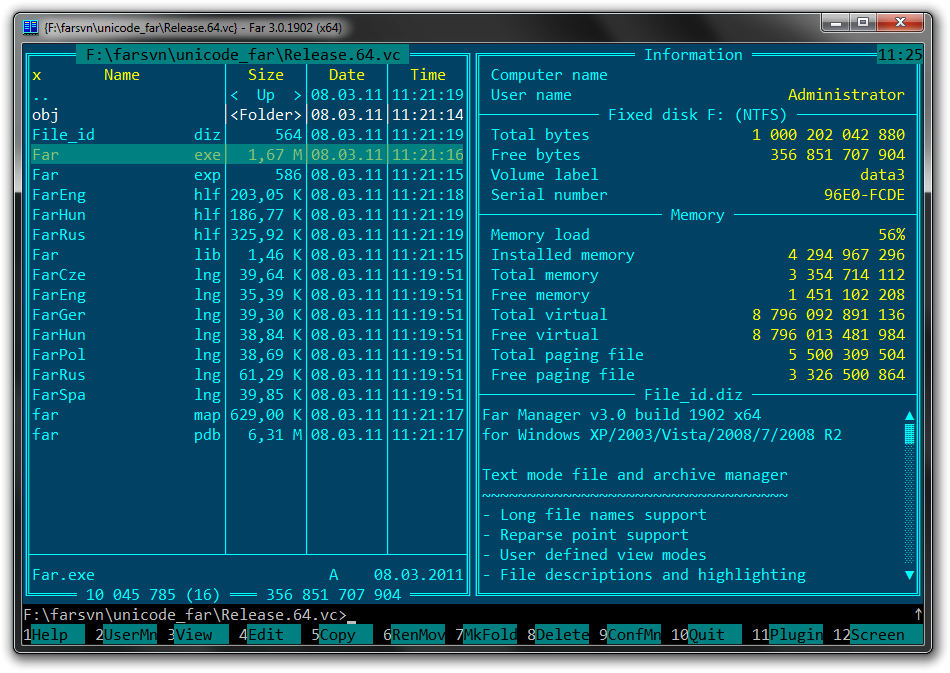
I’ve been in the computing world for 35 years; I’ve seen and been a small part of its evolution. I held membership in Fidonet (2:461/113) and operated my own dial-up BBS back in the 90s. I’m still a fan of tracker music and the demoscene. And yes, I still use the old Norton-style file commander on my modern Windows computer.

You won’t find me on big social platforms such as Facebook et al. I like the more old-school ways of talking: email, chat, phone call, or meeting face-to-face. For me, these feel more real and hold more substance than the ephemeral interactions of modern-day ‘social’ networks. Plus, I have more fun things to do with my time.

If you want to get in touch, just send me an email. If you’re curious about my life, take a look around this site. I’ve shared what I’m okay with everyone knowing. And if you’re here for work reasons, my LinkedIn is the place to go. If you just want to see some pictures, check out my photo album. I add new ones when I can.

You’ll find my latest posts below.

Warm regards,
Alex Radzishevsky.

.WAV file integrity test script (Python)

Analyzes .wav file structure, reports any inconsistencies.

# ======================================
# .WAV file structure integrity test
# Alex Radzishevsky
# www.radzishevsky.com
# February 2026
# ======================================

import struct
import os
import sys

def get_audio_format(code):
    formats = {
        0x0001: "PCM (Integer)",
        0x0003: "IEEE Float",
        0x0006: "ALAW",
        0x0007: "MULAW",
        0xFFFE: "WAVE_FORMAT_EXTENSIBLE"
    }
    return formats.get(code, f"Unknown/Compressed (0x{code:04x})")

def hex_dump(data, length=64):
    res = []
    for i in range(0, min(len(data), length), 16):
        chunk = data[i:i+16]
        hex_str = " ".join(f"{b:02x}" for b in chunk)
        ascii_str = "".join(chr(b) if 32 <= b <= 126 else "." for b in chunk)
        res.append(f"  {i:04x}:  {hex_str:<48}  |{ascii_str}|")
    return "\n".join(res)

def inspect_wav_comprehensive(file_path):
    if not os.path.exists(file_path):
        print(f"Error: File '{file_path}' not found.")
        return

    file_size = os.path.getsize(file_path)
    print(f"\n{'='*85}")
    print(f" ANALYSIS REPORT: {os.path.basename(file_path)}")
    print(f" SYSTEM FILE SIZE: {file_size} bytes")
    print(f"{'='*85}\n")

    with open(file_path, 'rb') as f:
        # --- 1. INITIAL HEX DUMP ---
        print("[01] HEADER HEX PREVIEW (First 64 Bytes)")
        print(hex_dump(f.read(64)))
        f.seek(0)
        print("-" * 85)

        # --- 2. GLOBAL RIFF HEADER ---
        header = f.read(12)
        if len(header) < 12:
            print("[CRITICAL ERROR] File is smaller than a 12-byte RIFF header. Investigation aborted.")
            return

        tag, r_size, w_tag = struct.unpack('<4sI4s', header)
        expected_riff_end = 8 + r_size
        
        print(f"[02] GLOBAL CONTAINER")
        print(f"  Container ID:    {tag.decode(errors='ignore')} (Expected: RIFF)")
        print(f"  Declared Size:   {r_size} bytes")
        print(f"  Format Type:     {w_tag.decode(errors='ignore')} (Expected: WAVE)")
        
        if r_size != file_size - 8:
            diff = (file_size - 8) - r_size
            status = "TRAILING DATA" if diff 0 else "TRUNCATED"
            print(f"  !! 
>>> Read the rest

Russia: The rotten inheritance of a fake empire

Today is December 31, 2025. Almost four years have passed since russia attacked Ukraine. A little more than 27 years since I left the ruins of the former USSR. And a little more than 47 years since I was born. And here is what I have understood.

Russia is a degenerate pseudo-state. Essentially — a concentration camp. A territory populated largely by alcoholics, thieves, and a brainwashed mass deprived of education, future, and human dignity. Hatred, contempt, and intolerance are the only “spiritual bonds” of so-called modern russia. Slave mentality as the norm. Complete inability to think, to have or express one’s own opinion. Contempt for others and, as a natural consequence, total contempt for themselves.

This is a country existing by inertia — a rotting echo of a long-dead Soviet past, which itself was a fake, a camp, and a lie. A country that produces nothing but oil, propaganda, lies, and emigrants. A country of envy. A country where man is the enemy of man. A country where, instead of education, the population is systematically, methodically, and deliberately dumbed down.

A country with endless territories behind which lies endless desolation. Lawlessness, rudeness, brute vulgarity. A country where the law exists only for the weak and the poor. Where it is interpreted conveniently, rewritten on demand, and used as a club. Not a state, but a territory of lawlessness.

A … >>> Read the rest

The Unbeatable Ukrainian Proverb: Why “Dead Bees Don’t Buzz”

As someone who speaks several languages, I’ve always been fascinated by folk wisdom. Every language has its own unique way of packaging universal truths into memorable little phrases. But I have to say, Ukrainian sayings often possess a special kind of sharpness — a blend of dark humor and piercing sarcasm that cuts straight to the point. It’s a quality I’ve yet to find paralleled in English, Russian, or Hebrew.

There is one proverb, in particular, that I find myself using almost daily. It has become a personal mantra for letting things go. It goes like this:

“Мертвi бджоли не гудуть.” (Pronounced: Mert-vi bd-zho-ly ne hoo-doot’)

Literally, it means, “Dead bees don’t buzz.”

The meaning is as simple as it is profound: what’s done is done. It’s a stark, powerful reminder that it is pointless to worry about something that is already over. A missed deadline, a past mistake, a closed door — once it’s finished, it’s finished. The bees have stopped buzzing. The phrase is also perfectly suited for more literal situations, like when a piece of equipment has irrevocably broken down.

But what makes this proverb so special? To understand its genius, let’s compare it to its counterparts in other languages.

English and Hebrew offer several excellent sayings that capture the spirit of finality and the uselessness of worrying about the past, but they lack the Ukrainian … >>> Read the rest

min-win.ps1 — Building a silent, rock-solid Windows 11 appliance

I had a goal: to turn a small, modern PC into a completely silent, ultra-reliable backup server. I wanted a machine that could sit in a corner and run for years, sipping power and generating virtually no heat or noise. I could do it with Linux, but for some unrelated reasons, I had to do it on Windows. But a default installation of Windows 11 is anything but quiet.

A modern Windows OS is a bustling metropolis of activity. It’s constantly talking to the cloud, checking for updates, running telemetry services, scanning files with Defender, indexing drives, and running dozens of scheduled tasks. For a desktop, this is fine. For a dedicated appliance that needs to be stable and predictable, it’s a nightmare of unwanted reboots, random CPU spikes, and unnecessary disk I/O.

My solution? I decided to tame the beast. After extensive research and testing, I’ve created min-win.ps1, a comprehensive PowerShell script designed to strip down and harden Windows 10 or 11 into the perfect, minimalist appliance OS. Today, I’m releasing it for everyone.

What is min-win.ps1?

At its core, min-win.ps1 is a powerful configuration tool that systematically disables non-essential features to create a quiet, low-heat, and stable Windows environment. It’s not just another “debloater” that blindly removes apps. It’s an intelligent, reversible hardening script focused on long-term stability for always-on systems.

You can … >>> Read the rest

Phone call recording on OnePlus 13

This is more of a “note to self”, but it may also be useful for others looking for a solution.

Phone: OnePlus 13, OxygenOS 15 (Android 15).
Bought in Israel.
OS version: CPH2653_15.0.0.840(EX01).

No “call recording” function in either the device Settings or the Phone app. The majority of call recording apps produce silent files even if they seem to run.

Good news! “Cube ACR” + “Cube ACR Helper” pair work well for call recording. Requires permission under Accessibility. Records call audio in both directions (incoming + outgoing) natively from the system, not via the speaker. Seems to use the audio channel intended for ASR (automatic speech recognition) uses, part of the accessibility features.

Automating Network Drives: A Scripted Fix for Windows Explorer Hang-ups

To seamlessly access the office server, I’ve mapped several network drives on my Windows laptop. While this setup works perfectly in the office, things get a bit tricky when I work from home — the Windows File Explorer sometimes hangs while trying to access unavailable drives. This has been a known Windows issue for at least a decade, if not longer. Tired of the hassle, I decided to implement a solution.

The fix was both simple and effective, consisting of two key steps:

  • Create a script that automatically maps drives when they’re accessible and disconnects them when they aren’t.
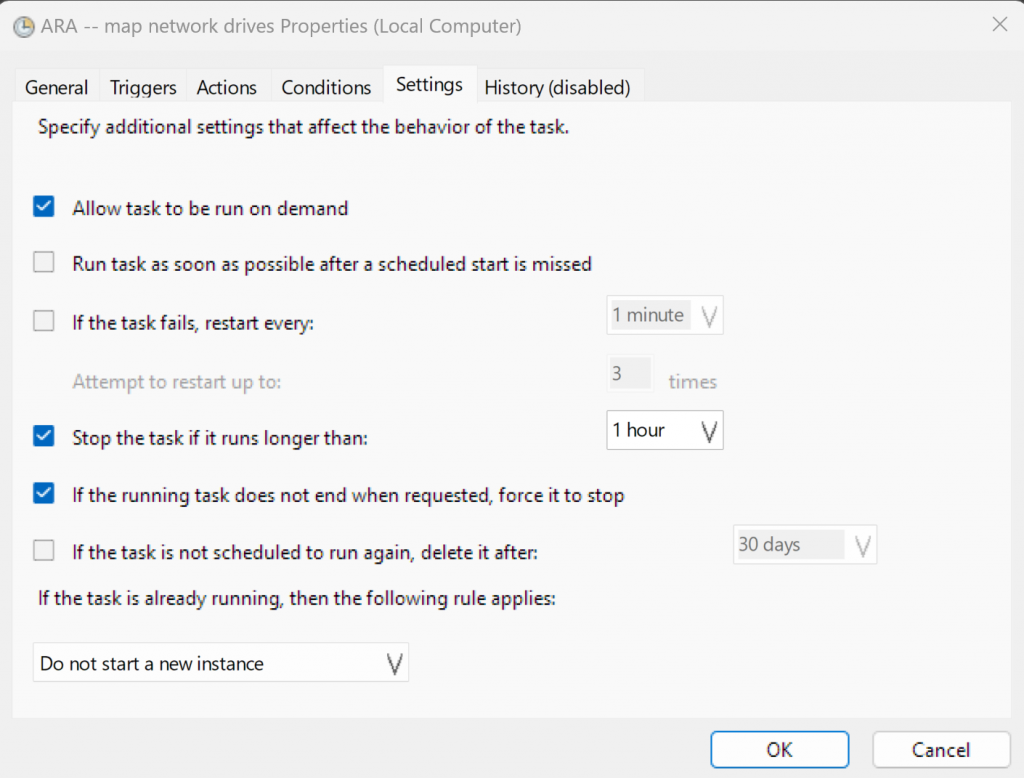
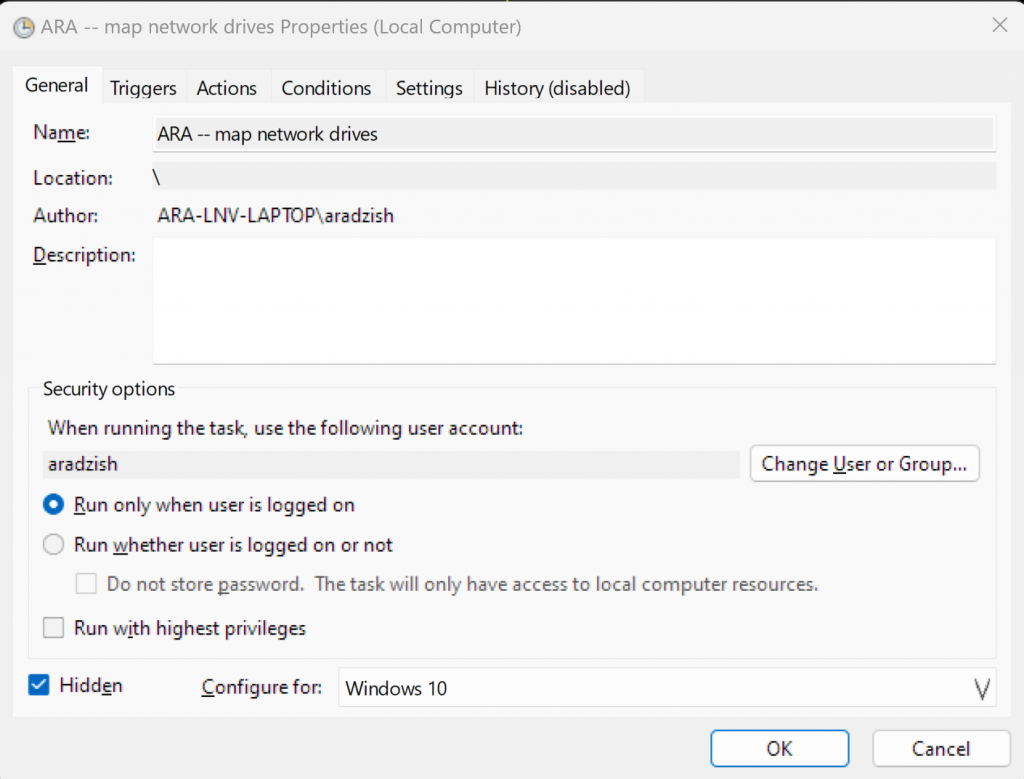
  • Configure the script to run at every Windows log-on or unlock.

Below is a straightforward DOS batch script to accomplish this task:

@echo off
SET ip=192.168.0.99
SET login=username
SET pass=somepassword

ping -n 1 %ip% | find "TTL=" nul 2&1
ECHO %errorlevel%
if %errorlevel%==0 (
    % Map network path as drive X
    net use X: \%ip%\some_path /user:%login% %pass% nul 2&1
) else (
    % Unmap the network path
    net use X: /delete /yes nul 2&1
)

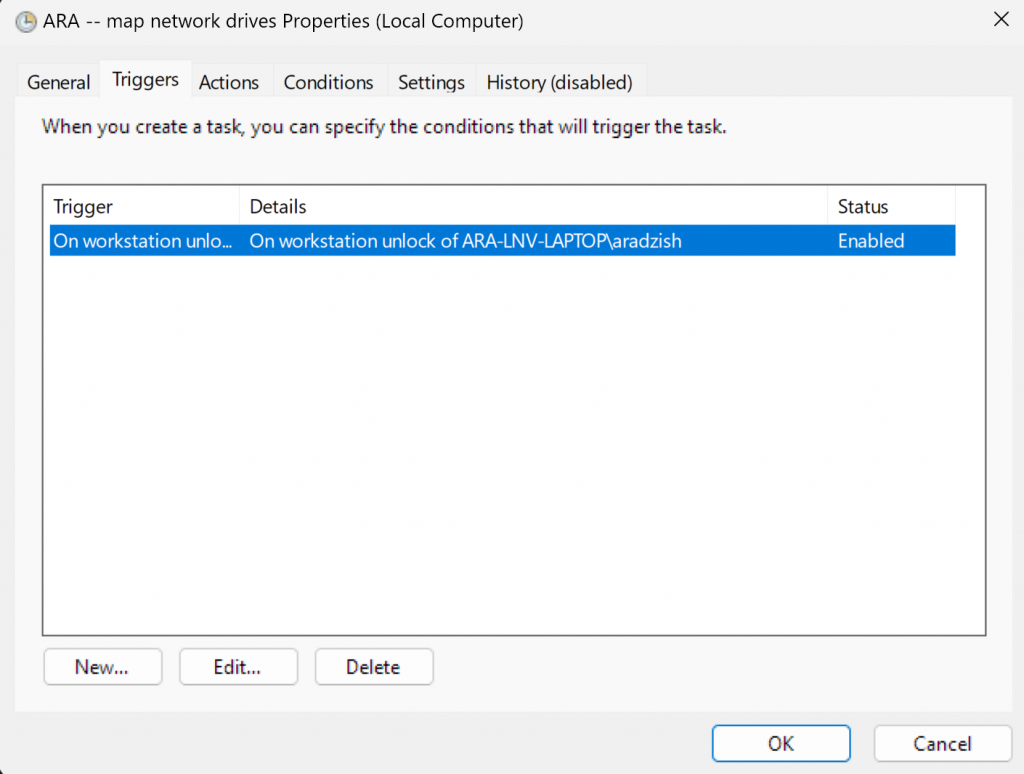
Save this batch file somewhere. Now, you need to add it to the Windows Task Scheduler as a task on each system unlock or log-on:

Arguments:

-WindowStyle Hidden -command "Start-Process cmd.exe -ArgumentList '/c D:\WORK\....\name.bat' -WindowStyle Hidden"

If you did everything correctly, now your File Explorer will never hang up on scanning network drives.… >>> Read the rest

far2l: Far Manager for Linux

I work mostly with a keyboard. It’s a 30-plus-year habit. The mouse is a secondary tool. I started with Norton Commander back in the 80s, then I used Volcov Commander, then I switched to using CONNECT by Dmitry Orlov, and finally to FAR Manager by Eugeny Roshal on Windows machines.

I use FAR Manager today, too, and I am deeply thankful to the people who continue developing it. FAR Manager became the first tool I install on each new machine, and it is the tool I use the most on a daily basis.

It turns out that FAR has also been ported to Linux, and I’m ashamed that I discovered it only today. The project is called “far2l” and is located here: GitHub – elfmz/far2l: Linux port of FAR v2. It works fine in Ubuntu, and I read it even works on Mac! I know there is MC (MidnightCommander), but I do not like it, so finding the FAR port for Linux was a huge surprise.

Moreover, if you stumble upon a Linux variant in which far2l is not available, there is a good chance that you can still use it by downloading a “portable” pre-compiled binary variant of far2l from here: Releases · spvkgn/far2l-portable

The Futile “Silent Album” Protest

I was extremely surprised and disappointed to learn that over 1,000 prominent musicians—including Kate Bush and Damon Albarn — launched a “silent protest” on Spotify, objecting to the use of copyrighted music to train AI.

www.theguardian.com/technology/2025/feb/25/kate-bush-damon-albarn-1000-artists-silent-ai-protest-album-copyright

These individuals seem to believe that legal restrictions can magically halt technological progress — a notion so naïve it verges on outright foolishness. I had expected more from some of these signatories. History shows that no laws or prohibitions have ever stopped the advance of technology. As the saying goes, “History teaches us that man learns nothing from history” (Georg Wilhelm Friedrich Hegel) — and these protestors underscore that point perfectly. They appear not to have learned from the past, or they think “this time it will work.”

I speak from experience, having grown up behind the Iron Curtain of the Soviet Union and witnessing firsthand how restrictions failed to suppress pirated software, knowledge and freedom. No ban will stop AI development: if training is outlawed in one country, it will simply happen in another — or go underground. Progress cannot and will not be stopped, in any field. It’s almost comical to see a group of “greats” genuinely believe they can halt it.

I’ve written a short piece that touches on this issue:

www.audiowatermarking.com/blog/defending-the-authenticity-of-sound-in-the-age-of-ai-how-advanced-audio-watermarking-technologies-are-re-emerging/

and while it doesn’t address this protest directly, its key points certainly apply.

Fighting the unstoppable wave of progress … >>> Read the rest

Executable code protection and obfuscation in MacOS

If you, like me, want to distribute a binary executable program for macOS and introduce at least a minimal level of protection—such as hiding text and literals in the binary or obfuscating the code—you may notice that, as of now (end of 2024), few tools are available for this purpose. Unlike Windows, which has numerous EXE protection software options, macOS developers often find themselves at a disadvantage due to the lack of such tools.

This information may be helpful if you are developing in C or C++ and compiling your program using GCC or Clang.

I found “Hikari”, a custom Clang toolchain: https://github.com/HikariObfuscator/Hikari

Although its page says that it is already deprecated as of 2024, it is still usable and has at least a few actively maintained forks.

Hikari is a modified version of LLVM that incorporates several advanced obfuscation techniques to protect software from reverse engineering. Obfuscation in Hikari essentially transforms the code so that it is functionally the same but is much harder for a reverse engineer to analyze and understand. Here’s an overview of the main concepts and techniques involved in Hikari obfuscation:

1. Purpose of Obfuscation

Obfuscation aims to protect intellectual property, software algorithms, and proprietary logic from being extracted or understood through reverse engineering. By making the code harder to read or follow, obfuscation raises the difficulty of tasks like decompiling, debugging, or reconstructing code … >>> Read the rest